Industry
Metals & mining
Client
Rovjok Oy
PEADAR: Tablet application
Intro
PEADAR (Pervasive Exploitation Activity Detection & Response) is a purpose‑built tablet application designed to help artisanal and small‑scale mining operations monitor, understand, and respond to environmental impacts on surrounding forests and waterways. Developed as part of a mining industry innovation challenge, the product leverages satellite imagery, geospatial data, and supply‑chain analytics to enable responsible mining practices in regions where technical resources and data literacy are often limited.
The application was commissioned by Rovjok Oy and conceived as a tablet‑first system, optimized for field use by inspectors, analysts, and decision‑makers operating in remote environments. PEADAR is structured around three core functional modules:
Supply Chain View – visibility into upstream and downstream mining-related flows
Explore View – geospatial exploration and satellite-based environmental monitoring
Response View – actionable insights and decision support for mitigation and reporting
My role covered the end‑to‑end UX and UI design, including interaction design, information architecture, component systems, and visual language. In addition, I created promotional materials and supported the pitch and final submission for the innovation challenge.
Challenges
Designing for High‑Complexity Data With Low Cognitive Overhead
PEADAR needed to surface highly technical data, such as satellite imagery, geospatial overlays, environmental indicators, and supply‑chain analytics, without overwhelming users who may not have formal training in GIS systems or data analytics.
Key UX risks included:
Dense dashboards creating decision paralysis
Map‑heavy interfaces becoming visually noisy or unreadable
Analytical outputs lacking a clear sense of prioritization or actionability
The challenge was to translate complex, multi‑layered data into visual hierarchies and interaction patterns that support rapid situational awareness rather than deep expert analysis.
Tablet‑First, Field‑Ready Interaction Constraints
Unlike desktop analytics tools, PEADAR is designed primarily for tablet use, often in:
Outdoor or semi‑controlled environments
Varying lighting conditions
Short, interrupted usage sessions
This introduced constraints related to:
Touch accuracy and reach ergonomics
Readability at different distances and angles
Reduced tolerance for dense navigation or multi‑step workflows
The interface needed to feel robust and calm, with interactions optimized for direct manipulation, clear affordances, and minimal reliance on precision input.
Integrating Geospatial Exploration With Analytical Dashboards
A core design challenge was balancing map‑based exploration with structured analytical views. Users needed both:
A spatial understanding of where mining impacts are occurring
Quantitative context explaining how severe, how widespread, and how urgent those impacts are
The risk was fragmenting the experience into disconnected modes. The system instead needed to feel cohesive, allowing users to smoothly move from location → insight → action.
Establishing Trust and Credibility in an Environmental Monitoring Tool
Because PEADAR informs environmental compliance and mitigation decisions, the UI needed to communicate:
Accuracy
Transparency
Professional rigor
Overly decorative visuals or consumer‑style UI patterns would undermine trust. Conversely, overly technical aesthetics risked alienating less expert users. This created a tension between approachability and authority.
Solution
1. Modular Information Architecture Aligned to User Intent
The application is structured around three main modules, each reflecting a distinct user mindset:
Explore → What is happening, and where?
Analyze / Supply Chain → Why is it happening, and how does it connect?
Respond → What should be done next?
This separation allows users to enter the system at the level of abstraction they need, without forcing a linear workflow. A persistent top navigation anchors these modules, enabling confident movement across views while maintaining orientation.
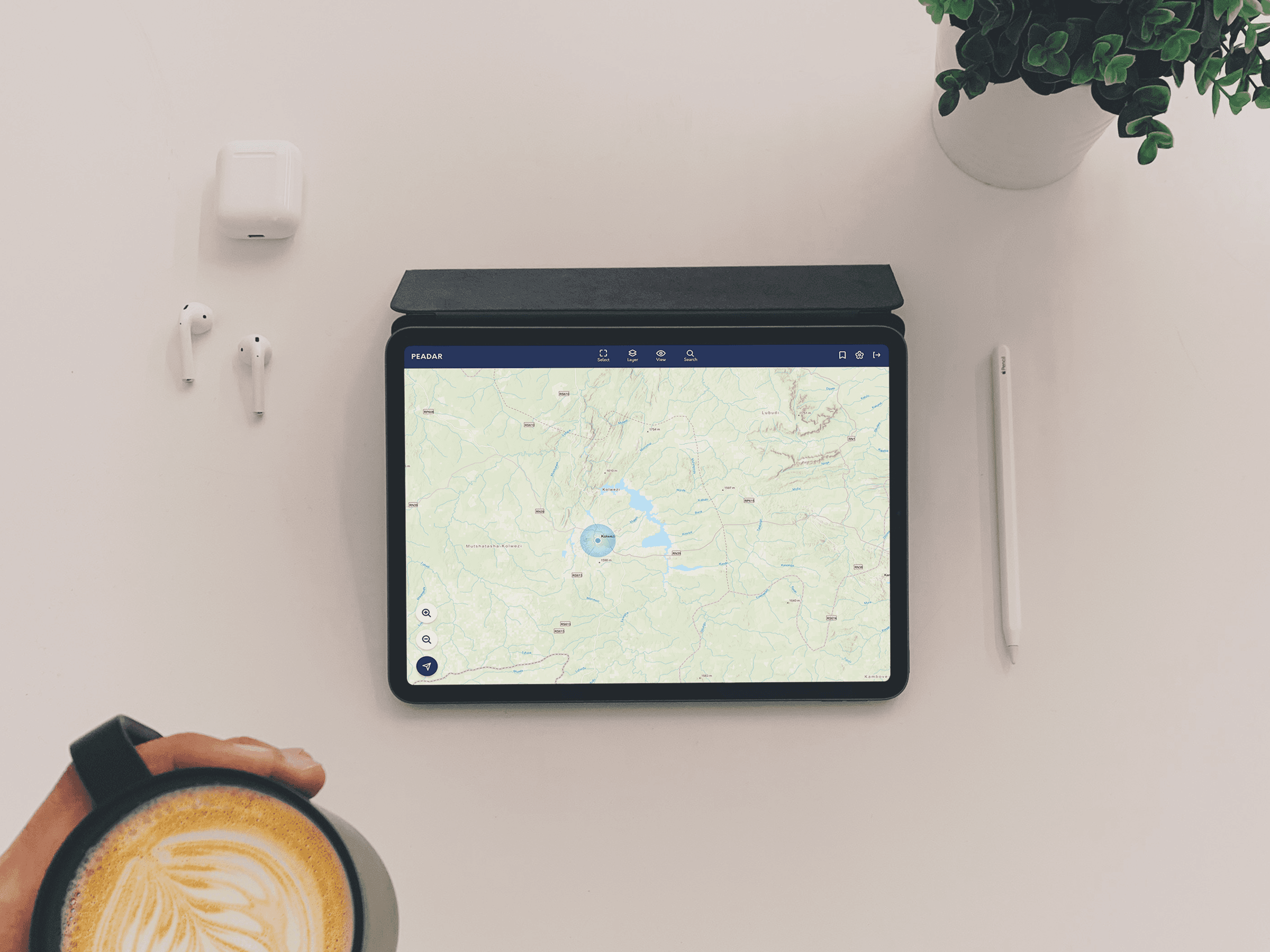
2. Map‑Centered Interaction With Contextual Controls
The Explore View prioritizes a large, uncluttered map canvas displaying satellite imagery and geospatial markers. Supporting UI elements, such as layer toggles, zoom controls, and filters, are visually secondary and docked to screen edges to preserve spatial clarity.
Key design decisions included:
High‑contrast map markers optimized for outdoor visibility
Contextual overlays that appear only when relevant
Progressive disclosure of data density based on zoom level
This ensures that the map acts as a primary sense‑making surface, not just a backdrop for controls.
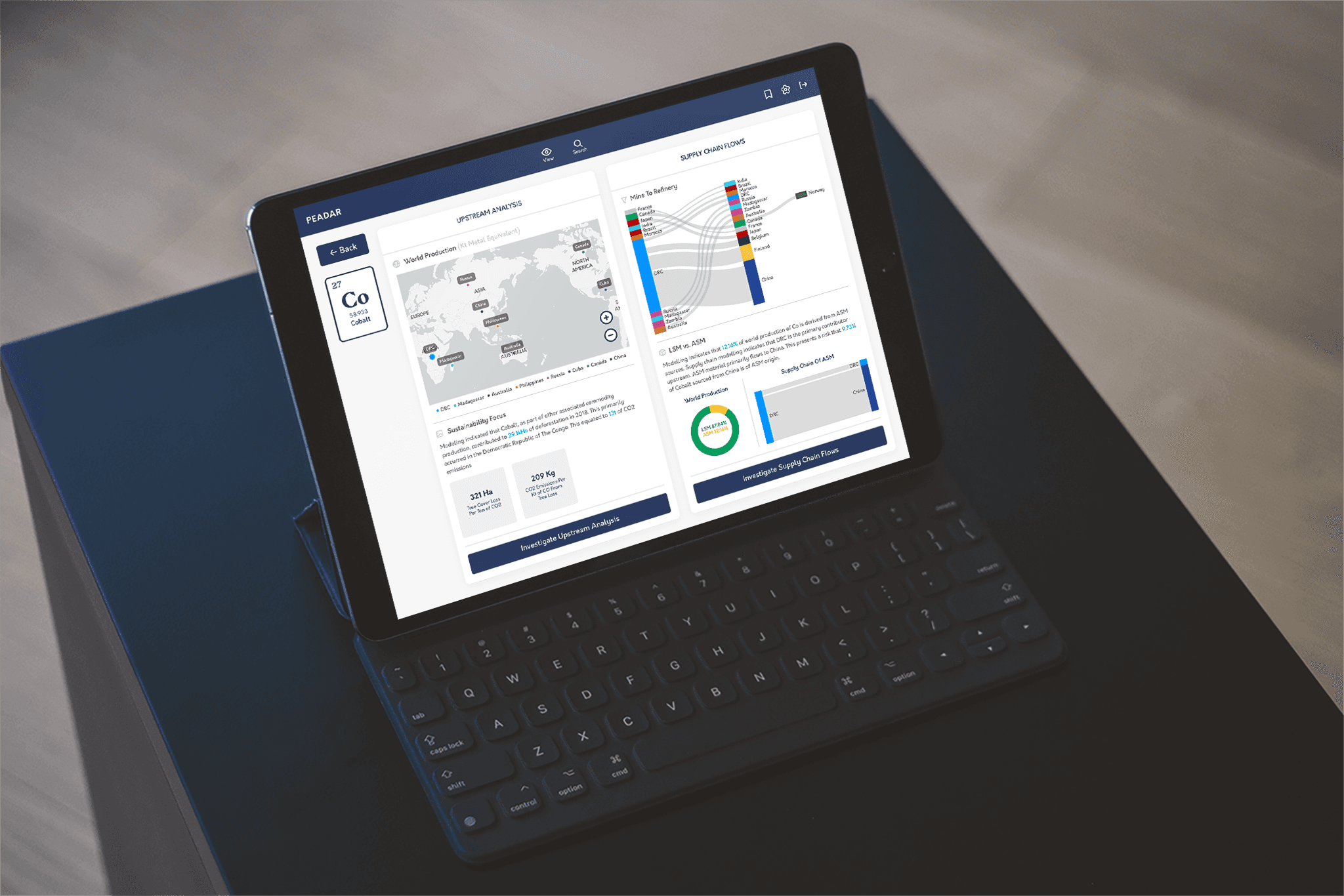
3. Analytical Dashboards Designed for Scanning, Not Reading
In the Supply Chain and Analysis views, data is presented using:
Structured cards
Clear visual hierarchies
Mixed data representations (maps, charts, flow diagrams, summary metrics)
Rather than long tables or dense textual explanations, insights are surfaced through:
Comparative bar charts
Proportional visualizations
Key environmental indicators summarized at a glance
This supports rapid scanning and pattern recognition, allowing users to detect anomalies or trends without deep analysis.
4. Tablet‑Optimized Interaction and Visual System
All layouts were designed specifically for landscape tablet orientation, with:
Large, touch‑friendly hit areas
Consistent spacing and rhythm to reduce visual fatigue
High legibility typography suitable for field conditions
The visual language uses a restrained, professional color palette dominated by deep blues and neutral tones, reinforcing trust while allowing data visualizations and alerts to stand out clearly.
Subtle depth, elevation, and card separation guide attention without relying on heavy borders or visual noise.
5. Actionable Response Design
The Response View bridges insight and intervention by framing outputs in terms of:
Severity
Priority
Recommended next steps
Rather than presenting raw data alone, the UI supports decision‑making workflows, helping users translate environmental observations into concrete responses such as reporting, monitoring, or mitigation planning.
Impacts
Improved Environmental Visibility for Small‑Scale Mining Operations
PEADAR enables organizations with limited technical infrastructure to access satellite‑driven environmental intelligence in a usable, comprehensible form. This significantly lowers the barrier to responsible environmental monitoring and early detection of ecological impact.
Faster, More Confident Decision‑Making
By emphasizing clarity, hierarchy, and actionability, the interface reduces the cognitive effort required to interpret complex datasets. Users can move quickly from spatial observation to analytical insight, supporting timely responses in sensitive environmental contexts.
Strong Reception in an Innovation Challenge Context
As a finalist submission, PEADAR demonstrated that thoughtful UX/UI design can be a differentiator even in highly technical, data‑driven domains. The product communicated credibility and forward‑thinking responsibility through both its functionality and visual execution.
A Scalable Design Foundation
The modular structure, tablet‑first design system, and clear separation between exploration, analysis, and response create a strong foundation for:
Future feature expansion
Integration of additional data sources
Adaptation to other environmental or resource‑monitoring use cases